DNS 查询工具 dig
1. 概述
dig (Domain Information Groper) 是 Linux 系统中一个功能强大的 DNS 查询工具,用于查询 DNS 域名服务器。与传统的 nslookup 相比,dig 提供了更详细的查询结果和更灵活的查询选项。
dig 命令的主要特点:
- 显示完整的 DNS 查询过程
- 支持所有 DNS 记录类型查询
- 可以指定查询特定的 DNS 服务器
- 输出格式清晰易读
1.1 CentOS7安装dig软件
CentOS7使用以下命令安装即可:
1
| yum install bind-utils -y
|
2. dig基本使用
2.1 查看帮助信息
使用dig -h即可查看帮助信息:
 1
 2
 3
 4
 5
 6
 7
 8
 9
10
11
12
13
14
15
16
17
18
19
20
21
22
23
24
25
26
27
28
29
30
31
32
33
34
35
36
37
38
39
40
41
42
43
44
45
46
47
48
49
50
51
52
53
54
55
56
57
58
59
60
61
62
63
64
65
66
67
68
69
70
71
72
73
74
75
76
77
78
79
80
81
82
83
84
85
86
87
88
89
90
91
92
93
94
| [root@localhost ~]# dig -h
Usage: dig [@global-server] [domain] [q-type] [q-class] {q-opt}
{global-d-opt} host [@local-server] {local-d-opt}
[ host [@local-server] {local-d-opt} [...]]
Where: domain is in the Domain Name System
q-class is one of (in,hs,ch,...) [default: in]
q-type is one of (a,any,mx,ns,soa,hinfo,axfr,txt,...) [default:a]
(Use ixfr=version for type ixfr)
q-opt is one of:
-4 (use IPv4 query transport only)
-6 (use IPv6 query transport only)
-b address[#port] (bind to source address/port)
-c class (specify query class)
-f filename (batch mode)
-i (use IP6.INT for IPv6 reverse lookups)
-k keyfile (specify tsig key file)
-m (enable memory usage debugging)
-p port (specify port number)
-q name (specify query name)
-t type (specify query type)
-u (display times in usec instead of msec)
-x dot-notation (shortcut for reverse lookups)
-y [hmac:]name:key (specify named base64 tsig key)
d-opt is of the form +keyword[=value], where keyword is:
+[no]aaflag (Set AA flag in query (+[no]aaflag))
+[no]aaonly (Set AA flag in query (+[no]aaflag))
+[no]additional (Control display of additional section)
+[no]adflag (Set AD flag in query (default on))
+[no]all (Set or clear all display flags)
+[no]answer (Control display of answer section)
+[no]authority (Control display of authority section)
+[no]badcookie (Retry BADCOOKIE responses)
+[no]besteffort (Try to parse even illegal messages)
+bufsize=### (Set EDNS0 Max UDP packet size)
+[no]cdflag (Set checking disabled flag in query)
+[no]class (Control display of class in records)
+[no]cmd (Control display of command line)
+[no]comments (Control display of comment lines)
+[no]cookie (Add a COOKIE option to the request)
+[no]crypto (Control display of cryptographic fields in records)
+[no]defname (Use search list (+[no]search))
+[no]dnssec (Request DNSSEC records)
+domain=### (Set default domainname)
+[no]dscp[=###] (Set the DSCP value to ### [0..63])
+[no]edns[=###] (Set EDNS version) [0]
+ednsflags=### (Set EDNS flag bits)
+[no]ednsnegotiation (Set EDNS version negotiation)
+ednsopt=###[:value] (Send specified EDNS option)
+noednsopt (Clear list of +ednsopt options)
+[no]expire (Request time to expire)
+[no]fail (Don't try next server on SERVFAIL)
+[no]header-only (Send query without a question section)
+[no]identify (ID responders in short answers)
+[no]idnin (Parse IDN names)
+[no]idnout (Convert IDN response)
+[no]ignore (Don't revert to TCP for TC responses.)
+[no]keepopen (Keep the TCP socket open between queries)
+[no]mapped (Allow mapped IPv4 over IPv6)
+[no]multiline (Print records in an expanded format)
+ndots=### (Set search NDOTS value)
+[no]nsid (Request Name Server ID)
+[no]nssearch (Search all authoritative nameservers)
+[no]onesoa (AXFR prints only one soa record)
+[no]opcode=### (Set the opcode of the request)
+[no]qr (Print question before sending)
+[no]question (Control display of question section)
+[no]rdflag (Recursive mode (+[no]recurse))
+[no]recurse (Recursive mode (+[no]rdflag))
+retry=### (Set number of UDP retries) [2]
+[no]rrcomments (Control display of per-record comments)
+[no]search (Set whether to use searchlist)
+[no]short (Display nothing except short
form of answer)
+[no]showsearch (Search with intermediate results)
+[no]sigchase (Chase DNSSEC signatures)
+[no]split=## (Split hex/base64 fields into chunks)
+[no]stats (Control display of statistics)
+subnet=addr (Set edns-client-subnet option)
+[no]tcp (TCP mode (+[no]vc))
+timeout=### (Set query timeout) [5]
+[no]topdown (Do +sigchase in top-down mode)
+[no]trace (Trace delegation down from root [+dnssec])
+trusted-key=#### (Trusted Key to use with +sigchase)
+tries=### (Set number of UDP attempts) [3]
+[no]ttlid (Control display of ttls in records)
+[no]ttlunits (Display TTLs in human-readable units)
+[no]unknownformat (Print RDATA in RFC 3597 "unknown" format)
+[no]vc (TCP mode (+[no]tcp))
+[no]zflag (Set Z flag in query)
global d-opts and servers (before host name) affect all queries.
local d-opts and servers (after host name) affect only that lookup.
-h (print help and exit)
-v (print version and exit)
[root@localhost ~]#
|
可以看到参数非常多。
详细可参考: https://www.runoob.com/linux/linux-comm-dig.html
此处转一下菜鸟教程上面的关键说明:
dig基本语法:dig [@server] [domain] [query-type] [query-class] [query-options]
参数说明:
| 参数 | 说明 |
|---|
@server | 指定要查询的 DNS 服务器(如 @8.8.8.8) |
domain | 要查询的域名(如 example.com) |
query-type | 查询的记录类型(如 A, MX, NS 等) |
query-class | 查询的类别(通常为 IN 表示 Internet最常用,互联网地址(IPv4/IPv6)、域名解析等核心场景,99% 的 DNS 查询都用这个) |
query-options | 额外的查询选项 |
常用查询类型:
dig 支持查询多种 DNS 记录类型,以下是常见的记录类型:
| 记录类型 | 说明 | 示例 |
|---|
| A | IPv4 地址记录 | dig example.com A |
| AAAA | IPv6 地址记录 | dig example.com AAAA |
| MX | 邮件交换记录 | dig example.com MX |
| NS | 域名服务器记录 | dig example.com NS |
| CNAME | 规范名称记录 | dig www.example.com CNAME |
| TXT | 文本记录 | dig example.com TXT |
| SOA | 授权起始记录 | dig example.com SOA |
| ANY | 所有记录 | dig example.com ANY |
2.2 dig与nslookup对比
使用nslookup和dig来查询百度的域名:
 1
 2
 3
 4
 5
 6
 7
 8
 9
10
11
12
13
14
15
16
17
18
19
20
21
22
23
24
25
26
27
28
29
30
31
32
33
34
35
36
37
38
39
| [root@localhost ~]# nslookup baidu.com
Server: 10.247.99.63
Address: 10.247.99.63#53
Non-authoritative answer:
Name: baidu.com
Address: 111.63.65.247
Name: baidu.com
Address: 111.63.65.103
Name: baidu.com
Address: 124.237.177.164
Name: baidu.com
Address: 110.242.74.102
[root@localhost ~]# dig baidu.com
; <<>> DiG 9.11.4-P2-RedHat-9.11.4-26.P2.el7_9.16 <<>> baidu.com
;; global options: +cmd
;; Got answer:
;; ->>HEADER<<- opcode: QUERY, status: NOERROR, id: 57801
;; flags: qr rd ra ad; QUERY: 1, ANSWER: 4, AUTHORITY: 0, ADDITIONAL: 1
;; OPT PSEUDOSECTION:
; EDNS: version: 0, flags:; udp: 4096
;; QUESTION SECTION:
;baidu.com. IN A
;; ANSWER SECTION:
baidu.com. 600 IN A 111.63.65.103
baidu.com. 600 IN A 124.237.177.164
baidu.com. 600 IN A 110.242.74.102
baidu.com. 600 IN A 111.63.65.247
;; Query time: 218 msec
;; SERVER: 10.247.99.63#53(10.247.99.63)
;; WHEN: Tue Nov 18 21:41:57 CST 2025
;; MSG SIZE rcvd: 138
[root@localhost ~]#
|
可以看到使用dig能获取到更详细的信息。
典型输出包含以下几个部分:
- HEADER 部分:显示查询的基本信息
opcode:操作码status:响应状态id:查询 IDflags:标志位(如 qr, rd, ra 等)
- QUESTION 部分:显示查询的问题
- ANSWER 部分:查询结果
- AUTHORITY 部分:权威域名服务器信息
- ADDITIONAL 部分:附加信息
- STATISTICS 部分:查询统计
2.3 不显示注释信息
; 开头的行是 dig 自动生成的注释,用于解释查询的上下文(版本、服务器、状态、耗时等),方便用户排查问题或理解解析过程。实际的 DNS 记录(如 A 记录、CNAME 记录等)会在没有 ; 的行中显示。
 1
 2
 3
 4
 5
 6
 7
 8
 9
10
11
12
13
14
15
| [root@localhost ~]# dig +nocomments baidu.com
; <<>> DiG 9.11.4-P2-RedHat-9.11.4-26.P2.el7_9.16 <<>> +nocomments baidu.com
;; global options: +cmd
;baidu.com. IN A
baidu.com. 600 IN A 111.63.65.247
baidu.com. 600 IN A 111.63.65.103
baidu.com. 600 IN A 124.237.177.164
baidu.com. 600 IN A 110.242.74.102
;; Query time: 158 msec
;; SERVER: 10.247.99.63#53(10.247.99.63)
;; WHEN: Tue Nov 18 21:50:39 CST 2025
;; MSG SIZE rcvd: 138
[root@localhost ~]#
|
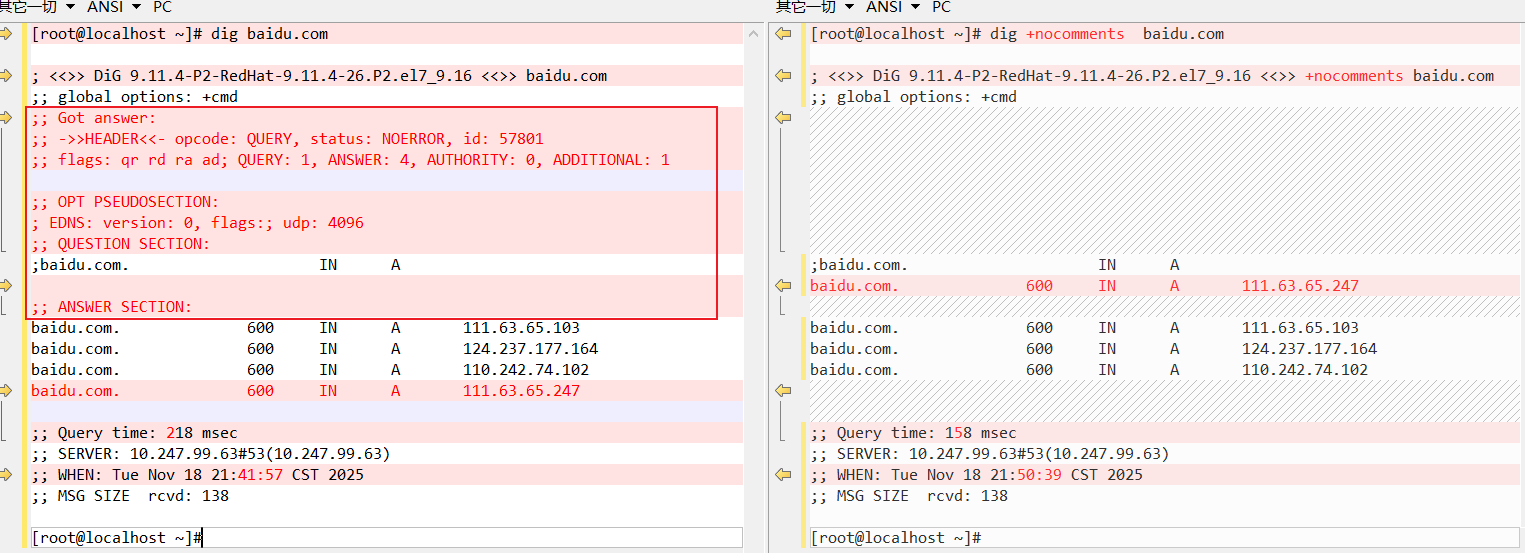
可以看到,当使用+nocomments参数时,比默认的输出结果少了以下信息:
1
2
3
4
5
6
7
8
| ;; Got answer:
;; ->>HEADER<<- opcode: QUERY, status: NOERROR, id: 57801
;; flags: qr rd ra ad; QUERY: 1, ANSWER: 4, AUTHORITY: 0, ADDITIONAL: 1
;; OPT PSEUDOSECTION:
; EDNS: version: 0, flags:; udp: 4096
;; QUESTION SECTION:
;baidu.com. IN A
|