Featured image of post 动态绑定class或style样式

动态绑定class或style样式

动态绑定class或style样式

操作元素的classstyle样式也是常见需求。Vue可以对元素的classstyle进行动态绑定。

绑定样式说明:

  • HTML中class属性定义了元素的样式类名。
  • HTML中style属性定义了HTML文档的样式信息。
  • Vue中可以通过v-bind:class来动态绑定样式类名。
  • Vue中可以通过v-bind:style来动态绑定样式信息。
  • v-bind:classv-bind:style都支持对象形式或数组形式进行绑定。
  • 对象语法形式:
    • v-bind:class="{ active: isActive, 'text-danger': hasError }"
    • v-bind:style="{ color: activeColor, fontSize: fontSize + 'px' }"
  • 数组语法形式:
    • v-bind:class="[activeClass, errorClass]"
    • v-bind:style="[baseStyles, overridingStyles]"
  • 数组中使用三元表达式:
    • <div v-bind:class="[isActive ? activeClass : '', errorClass]"></div> 这样会根据isActive是否为真,来添加activeClass样式类,而errorClass样式类始终会被添加。
  • 数组中使用对象语法:
    • <div v-bind:class="[{ active: isActive }, errorClass]"></div> 当数组中有多个样式需要进行条件判断时,使用三元表达式显得繁琐。

本节示例代码如下:

  1
  2
  3
  4
  5
  6
  7
  8
  9
 10
 11
 12
 13
 14
 15
 16
 17
 18
 19
 20
 21
 22
 23
 24
 25
 26
 27
 28
 29
 30
 31
 32
 33
 34
 35
 36
 37
 38
 39
 40
 41
 42
 43
 44
 45
 46
 47
 48
 49
 50
 51
 52
 53
 54
 55
 56
 57
 58
 59
 60
 61
 62
 63
 64
 65
 66
 67
 68
 69
 70
 71
 72
 73
 74
 75
 76
 77
 78
 79
 80
 81
 82
 83
 84
 85
 86
 87
 88
 89
 90
 91
 92
 93
 94
 95
 96
 97
 98
 99
100
101
102
103
104
105
106
107
108
109
110
111
112
113
114
115
116
117
118
119
120
121
122
123
124
125
126
127
128
129
130
131
<!DOCTYPE html>
<!-- name.html -->
<html>
	<head>
		<meta charset="utf-8">
		<title>Class 与 Style 绑定</title>
		<!-- 开发环境版本,包含了有帮助的命令行警告 -->
		<script src="https://cdn.jsdelivr.net/npm/vue/dist/vue.js"></script>
		<style>
			/* 用于多个div在一行显示 */
			.wrap {
				display: flex;
				flex-wrap: nowrap;
			}

			.static {
				width: 150px;
				height: 150px;
				border: 2px solid black;
				margin-left: 20px;

			}

			.active {
				font-size: 20px;
				margin: 10px;
				background: green;
				display: flex
			}

			.text-danger {
				background: red;
			}

			.text_warn {
				background: orange;
			}
		</style>
	</head>
	<body>
		<div id="app" style="margin-left: 100px;">
			<div class="wrap">
				<div style="width: 100px; height: 100px;text-align: center;line-height: 150px;"
					v-bind:class="{active: isActive}" class="static">
					hi vue
				</div>
				<div class="static">不使用动态绑定,显示150*150大小黑色边框的div</div>
				<!--
				由于isActive值为true,为真,所以对象中的`active`属性样式类可用。
				注意,此处`active`外面带不带引号都可以。
				hasError值为false,为假,所以对象中的`text-danger`属性样式类不可用。
				注意,此处因`text-danger`样式类名称中间有个`-`横线,因此必须带引号,
				否则会提示异常`
				[Vue warn]: Error compiling template:
				invalid expression: Unexpected token '-' in
				{active: isActive, text-danger: hasError}`,
				因此必须加上引号括起来。
				所以只渲染static active样式, 
				显示一个绿色的div块
				-->
				<div class="static" v-bind:class="{active: isActive, 'text-danger': hasError}">
					绿色div,字体20px,向右移动10px
				</div>
				<!--
				由于isActive值为true,是真,再使用!isActive取反,就是假,
				因此ative样式不起作用。
				!hasError值为true,所以渲染static text_warn样式类
				最终显示一个橘色的div
				-->
				<div class="static" v-bind:class="{'active': !isActive, text_warn: !hasError}">
					橘色div
				</div>
				<!--绑定的数据对象不必内联定义在模板里,也可以直接绑定data数据里的一个对象-->
				<div class="static" v-bind:class="classObject">
					在data中的对象元素中定义样式类对象
				</div>
				<!--也可以绑定一个返回对象的计算属性,这是一个常用且强大的模式-->
				<div class="static" v-bind:class="classComputedObject">
					通过计算属性返回样式类对象
				</div>
			</div>
			<div class="wrap">
				<div class="static" v-bind:style="{ color: activeColor, fontSize: fontSize + 'px' }">直接在对象中设置样式</div>
				<!--绑定样式对象-->
				<div class="static" v-bind:style="styleObject">通过绑定data中定义的样式对象来设置样式</div>
				<!--数组语法绑定多个样式-->
				<div class="static" v-bind:style="[ styleObject, overridingStyle ]">通过数组语法绑定样式</div>
			</div>
		</div>

		<!-- script脚本包裹了一段js代码 -->
		<script>
			// 去掉 vue 的 "You are running Vue in development mode" 提示
			Vue.config.productionTip = false
			var app = new Vue({
				// 此处的el属性必须保留,否则组件无法正常使用
				el: '#app',
				data: {
					isActive: true,
					hasError: false,
					classObject: {
						active: true,
						'text-danger': false,
					},
					activeClass: 'active', // 此时active和text-danger必须用引号引起来
					errorClass: 'text-danger', // 此时active和text-danger必须用引号引起来
					activeColor: 'green',
					fontSize: 24,
					styleObject: {
						color: 'red',
						fontSize: '24px',
					},
					overridingStyle: {
						'font-weight': 'bold',
						'background': 'yellow',
						'width': '400px',
						'height': '100px',
					}
				},
				computed: {
					classComputedObject: function() {
						return {
							active: this.isActive && (!this.hasError),
							'text-danger': this.isActive || this.hasError,
						}
					}
				}
			})
		</script>
	</body>
</html>

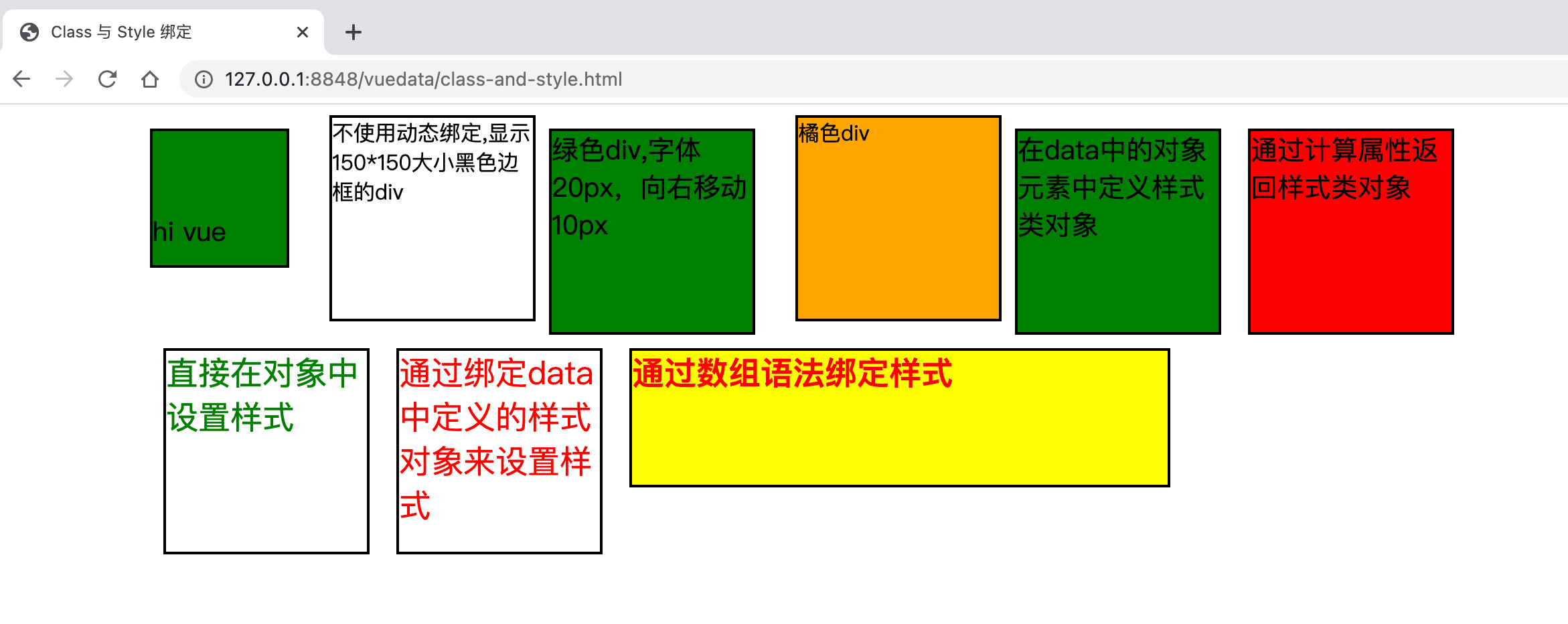
在浏览器中打开页面,看到效果如下:

利用上面的知识,我们来实现一个表格偶数行和奇数行渲染不同的背景色,并且当鼠标移动到每一行时,该行的颜色发生变化。

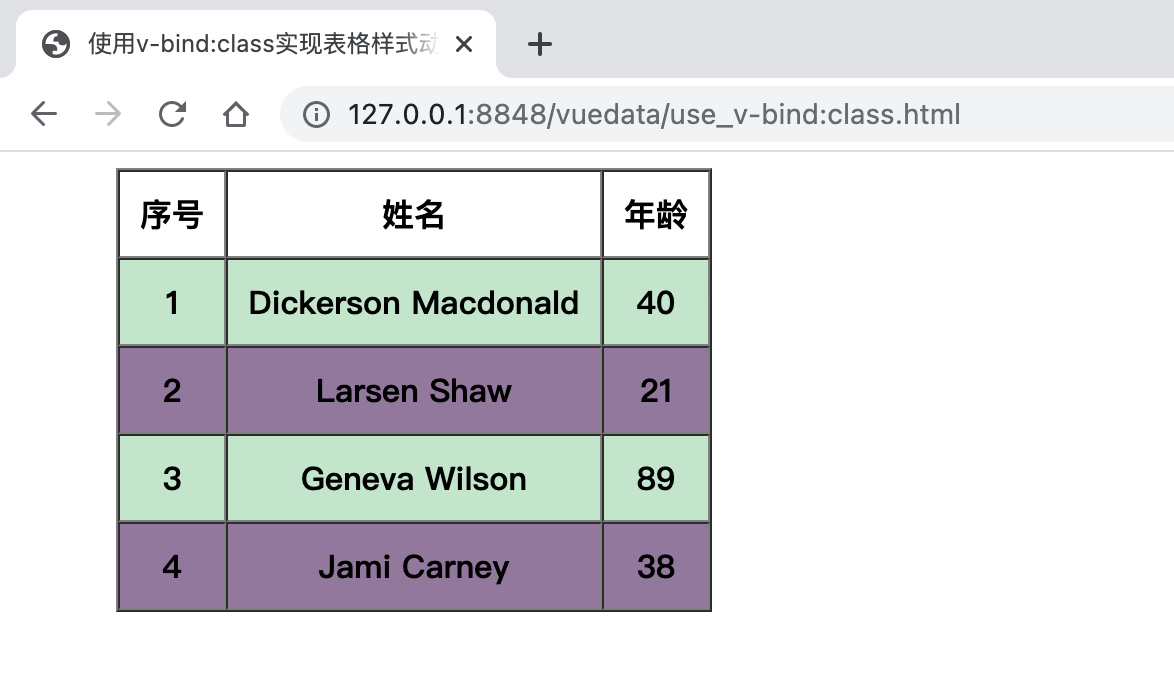
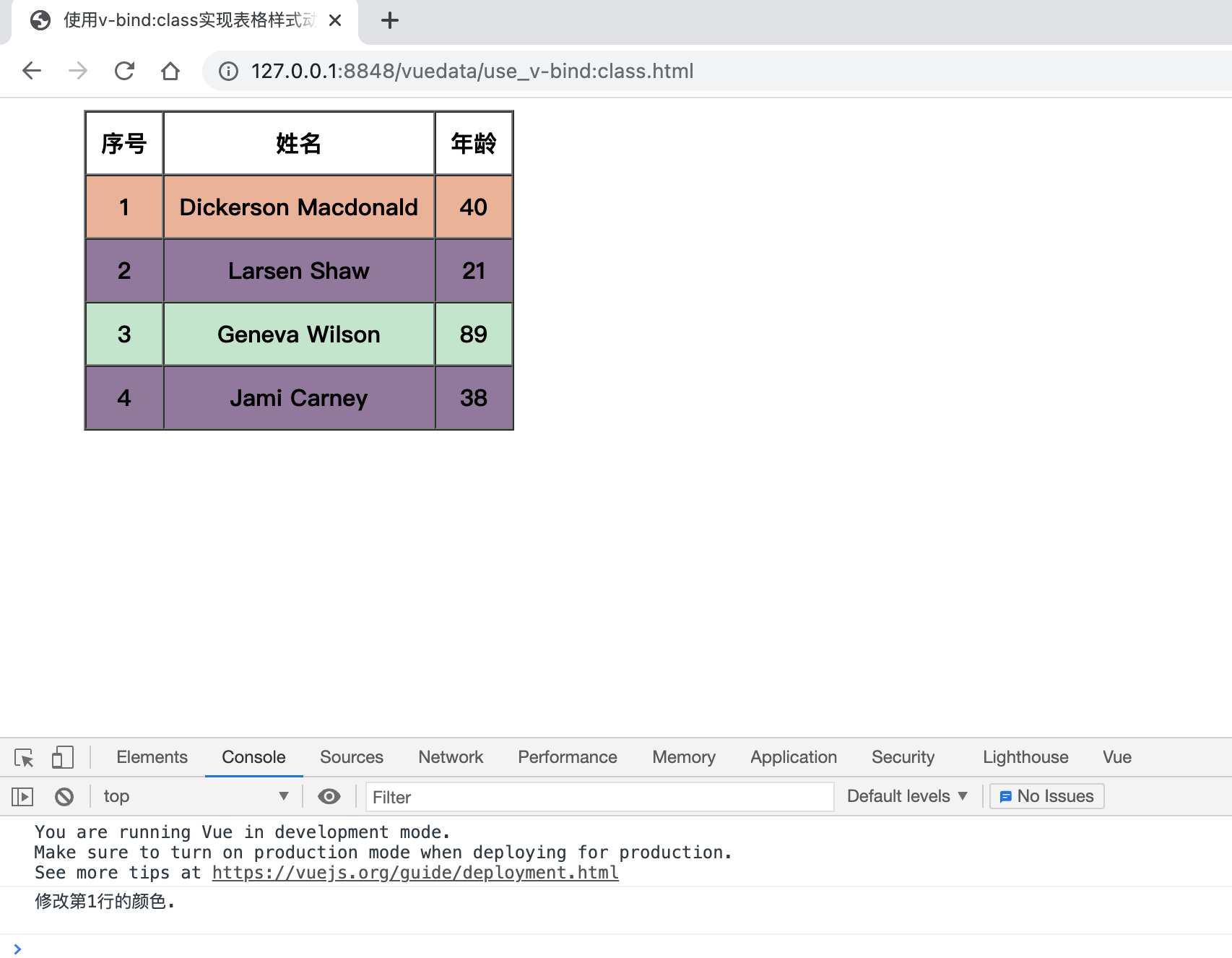
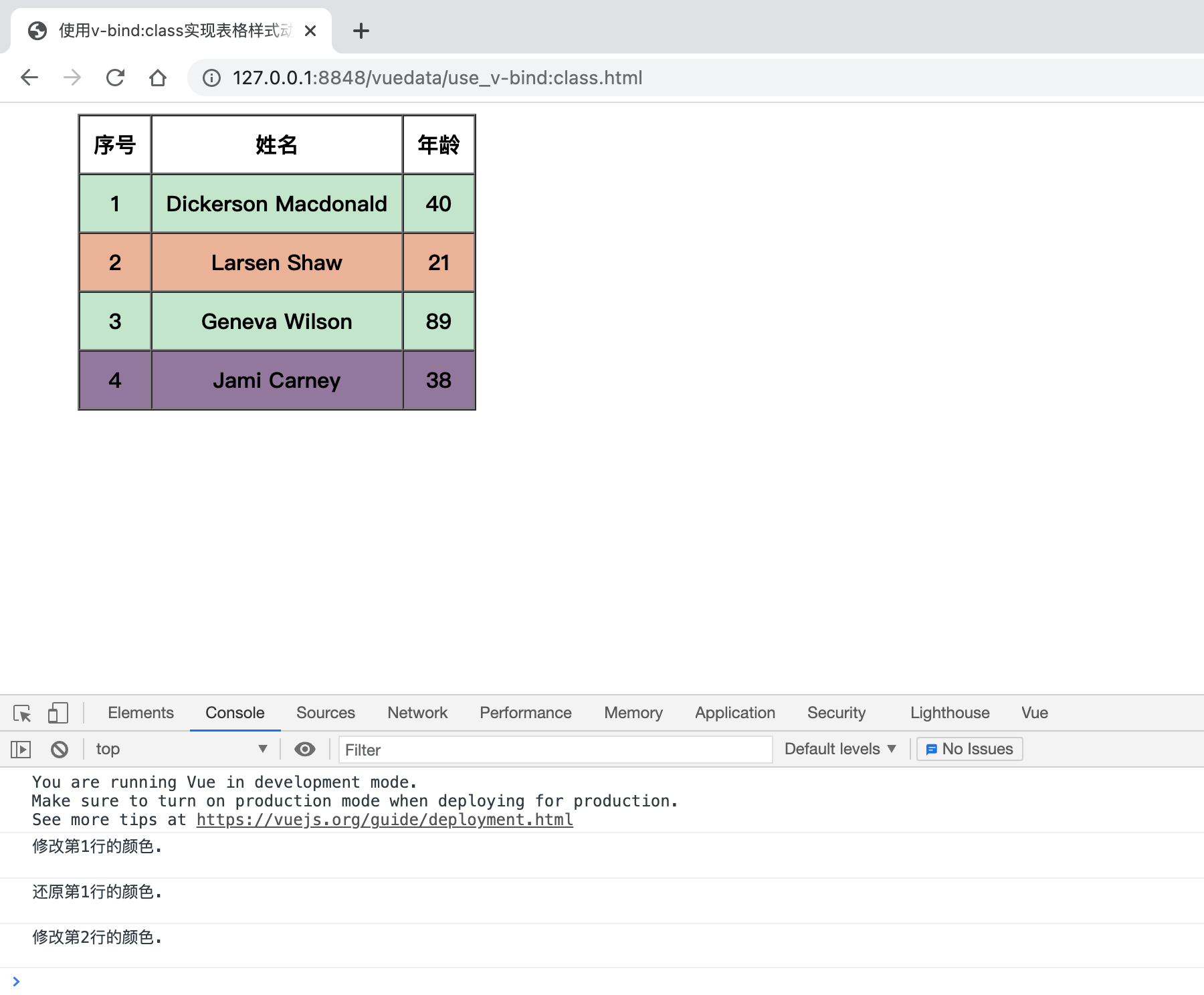
最终实现的效果如下图所示:

表格原始状态:

将鼠标移动到表格行上:

下面是代码:

  1
  2
  3
  4
  5
  6
  7
  8
  9
 10
 11
 12
 13
 14
 15
 16
 17
 18
 19
 20
 21
 22
 23
 24
 25
 26
 27
 28
 29
 30
 31
 32
 33
 34
 35
 36
 37
 38
 39
 40
 41
 42
 43
 44
 45
 46
 47
 48
 49
 50
 51
 52
 53
 54
 55
 56
 57
 58
 59
 60
 61
 62
 63
 64
 65
 66
 67
 68
 69
 70
 71
 72
 73
 74
 75
 76
 77
 78
 79
 80
 81
 82
 83
 84
 85
 86
 87
 88
 89
 90
 91
 92
 93
 94
 95
 96
 97
 98
 99
100
101
102
103
<!DOCTYPE html>
<!-- use_v-bind:class.html -->
<html>
  <head>
    <meta charset="utf-8">
    <title>使用v-bind:class实现表格样式动态绑定</title>
    <!-- 开发环境版本,包含了有帮助的命令行警告 -->
    <script src="https://cdn.jsdelivr.net/npm/vue/dist/vue.js"></script>
    <style>
      .active {
        background-color: #c3e6cb;
      }

      .other {
        background-color: #92789c;
      }

      .move-on {
        background-color: #eab498;
      }
    </style>
  </head>
  <body>
    <div id="app">
      <div style="margin-left: 50px;">
        <!-- 
        border="1" 给表格的每一格,及边框加上1像素的边框
        cellspacing="0" 单元格间距为0
        cellpadding="10" 单元格边距为10px
         -->
        <table border="1" cellspacing="0" cellpadding="10">
          <thead>
            <tr>
              <th>序号</th>
              <th>姓名</th>
              <th>年龄</th>
            </tr>
          </thead>
          <tbody>
            <!-- 
            v-on:mousemove.once 当鼠标移入时,执行函数,once修饰符只执行一次
            v-on:mouseleave 当鼠标移出时,执行函数
             -->
            <tr v-for="(item, index) in items"
              v-bind:class="[index % 2 === 0 ? activeClass: otherClass, {'move-on': index===moveOnFlag}]"
              v-on:mousemove.once="moveOn(index)" v-on:mouseleave="leave(index)">
              <th>{{index + 1}}</th>
              <th>{{item.first_name}} {{item.last_name}}</th>
              <th>{{item.age}}</th>
            </tr>
          </tbody>

        </table>
      </div>
    </div>

    <!-- script脚本包裹了一段js代码 -->
    <script>
      var app = new Vue({
        // 此处的el属性必须保留,否则组件无法正常使用
        el: '#app',
        data: {
          items: [{
              age: 40,
              first_name: 'Dickerson',
              last_name: 'Macdonald'
            },
            {
              age: 21,
              first_name: 'Larsen',
              last_name: 'Shaw'
            },
            {
              age: 89,
              first_name: 'Geneva',
              last_name: 'Wilson'
            },
            {
              age: 38,
              first_name: 'Jami',
              last_name: 'Carney'
            }
          ],
          activeClass: 'active',
          otherClass: 'other',
          moveOnFlag: -1,
        },
        methods: {
          moveOn: function(index) {
            let line = index + 1
            console.log('修改第' + line + '行的颜色.\n\n')
            this.moveOnFlag = index
          },
          leave: function(index) {
            let line = index + 1
            console.log('还原第' + line + '行的颜色.\n\n')
            this.moveOnFlag = -1
          }
        }
      })
    </script>
  </body>
</html>

代码关键点解释:

  • 代码中v-for="(item, index) in items"items数组进行循环读取处理。index是当前处理行的索引号。item是当前迭代的对象。

  • v-bind:class="[index % 2 === 0 ? activeClass: otherClass, {'move-on': index===moveOnFlag}]"使用了本节使用的动态绑定样式类名知识点。在数组语法中使用了对象语法。index % 2 === 0 ? activeClass: otherClass判断当前索引号是奇数还是偶数,是偶数的话,则渲染activeClass样式,是奇数的话,则渲染otherClass样式。

  • v-on:mousemove.once="moveOn(index)" v-on:mouseleave="leave(index)" 则实现鼠标移入和移出时调用不同的函数,来改变当前行的颜色。注意此处的.once修饰符,如果不使用该修饰符,鼠标移入时,会不停地执行moveOn函数,使用.once修饰符只会执行一次。

Licensed under the GNU General Public License v3.0