Featured image of post 数据输出美化模块-`pprint`

数据输出美化模块-`pprint`

数据输出美化模块-pprint

查看pprint模块有哪些函数或方法:

 1
 2
 3
 4
 5
 6
 7
 8
 9
10
$ python3
Python 3.6.8 (v3.6.8:3c6b436a57, Dec 24 2018, 02:10:22)
[GCC 4.2.1 (Apple Inc. build 5666) (dot 3)] on darwin
Type "help", "copyright", "credits" or "license" for more information.
>>> import pprint
>>> pprint.
pprint.isreadable(    pprint.pformat(       pprint.PrettyPrinter( pprint.saferepr(
pprint.isrecursive(   pprint.pprint(        pprint.re
>>> pprint.
>>> exit()

1. pprint模块的使用

参考官方文档,获取一下Flask模块最新的json信息:

 1
 2
 3
 4
 5
 6
 7
 8
 9
10
11
12
13
14
$ python3
Python 3.9.6 (default, Mar 10 2023, 20:16:38)
[Clang 14.0.3 (clang-1403.0.22.14.1)] on darwin
Type "help", "copyright", "credits" or "license" for more information.
>>> import pprint
>>> import json
>>> from urllib.request import urlopen
>>> url = 'https://pypi.org/pypi/Flask/json'
>>> with urlopen(url) as resp:
...    project_info = json.load(resp)['info']
...
>>> project_info
{'author': 'Armin Ronacher', 'author_email': 'armin.ronacher@active-4.com', 'bugtrack_url': None, 'classifiers': ['Development Status :: 5 - Production/Stable', 'Environment :: Web Environment', 'Framework :: Flask', 'Intended Audience :: Developers', 'License :: OSI Approved :: BSD License', 'Operating System :: OS Independent', 'Programming Language :: Python', 'Topic :: Internet :: WWW/HTTP :: Dynamic Content', 'Topic :: Internet :: WWW/HTTP :: WSGI', 'Topic :: Internet :: WWW/HTTP :: WSGI :: Application', 'Topic :: Software Development :: Libraries :: Application Frameworks'], 'description': 'Flask\n=====\n\nFlask is a lightweight `WSGI`_ web application framework. It is designed\nto make getting started quick and easy, with the ability to scale up to\ncomplex applications. It began as a simple wrapper around `Werkzeug`_\nand `Jinja`_ and has become one of the most popular Python web\napplication frameworks.\n\nFlask offers suggestions, but doesn\'t enforce any dependencies or\nproject layout. It is up to the developer to choose the tools and\nlibraries they want to use. There are many extensions provided by the\ncommunity that make adding new functionality easy.\n\n.. _WSGI: https://wsgi.readthedocs.io/\n.. _Werkzeug: https://werkzeug.palletsprojects.com/\n.. _Jinja: https://jinja.palletsprojects.com/\n\n\nInstalling\n----------\n\nInstall and update using `pip`_:\n\n.. code-block:: text\n\n    $ pip install -U Flask\n\n.. _pip: https://pip.pypa.io/en/stable/getting-started/\n\n\nA Simple Example\n----------------\n\n.. code-block:: python\n\n    # save this as app.py\n    from flask import Flask\n\n    app = Flask(__name__)\n\n    @app.route("/")\n    def hello():\n        return "Hello, World!"\n\n.. code-block:: text\n\n    $ flask run\n      * Running on http://127.0.0.1:5000/ (Press CTRL+C to quit)\n\n\nContributing\n------------\n\nFor guidance on setting up a development environment and how to make a\ncontribution to Flask, see the `contributing guidelines`_.\n\n.. _contributing guidelines: https://github.com/pallets/flask/blob/main/CONTRIBUTING.rst\n\n\nDonate\n------\n\nThe Pallets organization develops and supports Flask and the libraries\nit uses. In order to grow the community of contributors and users, and\nallow the maintainers to devote more time to the projects, `please\ndonate today`_.\n\n.. _please donate today: https://palletsprojects.com/donate\n\n\nLinks\n-----\n\n-   Documentation: https://flask.palletsprojects.com/\n-   Changes: https://flask.palletsprojects.com/changes/\n-   PyPI Releases: https://pypi.org/project/Flask/\n-   Source Code: https://github.com/pallets/flask/\n-   Issue Tracker: https://github.com/pallets/flask/issues/\n-   Website: https://palletsprojects.com/p/flask/\n-   Twitter: https://twitter.com/PalletsTeam\n-   Chat: https://discord.gg/pallets\n', 'description_content_type': 'text/x-rst', 'docs_url': None, 'download_url': '', 'downloads': {'last_day': -1, 'last_month': -1, 'last_week': -1}, 'home_page': 'https://palletsprojects.com/p/flask', 'keywords': '', 'license': 'BSD-3-Clause', 'maintainer': 'Pallets', 'maintainer_email': 'contact@palletsprojects.com', 'name': 'Flask', 'package_url': 'https://pypi.org/project/Flask/', 'platform': None, 'project_url': 'https://pypi.org/project/Flask/', 'project_urls': {'Changes': 'https://flask.palletsprojects.com/changes/', 'Chat': 'https://discord.gg/pallets', 'Documentation': 'https://flask.palletsprojects.com/', 'Donate': 'https://palletsprojects.com/donate', 'Homepage': 'https://palletsprojects.com/p/flask', 'Issue Tracker': 'https://github.com/pallets/flask/issues/', 'Source Code': 'https://github.com/pallets/flask/', 'Twitter': 'https://twitter.com/PalletsTeam'}, 'release_url': 'https://pypi.org/project/Flask/2.2.3/', 'requires_dist': ['Werkzeug (>=2.2.2)', 'Jinja2 (>=3.0)', 'itsdangerous (>=2.0)', 'click (>=8.0)', 'importlib-metadata (>=3.6.0) ; python_version < "3.10"', "asgiref (>=3.2) ; extra == 'async'", "python-dotenv ; extra == 'dotenv'"], 'requires_python': '>=3.7', 'summary': 'A simple framework for building complex web applications.', 'version': '2.2.3', 'yanked': False, 'yanked_reason': None}
>>>

直接打印Flask的项目信息,可以看到是很大一长串信息,可读性差。

美化输出:

  1
  2
  3
  4
  5
  6
  7
  8
  9
 10
 11
 12
 13
 14
 15
 16
 17
 18
 19
 20
 21
 22
 23
 24
 25
 26
 27
 28
 29
 30
 31
 32
 33
 34
 35
 36
 37
 38
 39
 40
 41
 42
 43
 44
 45
 46
 47
 48
 49
 50
 51
 52
 53
 54
 55
 56
 57
 58
 59
 60
 61
 62
 63
 64
 65
 66
 67
 68
 69
 70
 71
 72
 73
 74
 75
 76
 77
 78
 79
 80
 81
 82
 83
 84
 85
 86
 87
 88
 89
 90
 91
 92
 93
 94
 95
 96
 97
 98
 99
100
101
102
103
104
105
106
107
108
109
110
111
112
113
114
115
116
117
118
119
120
121
122
123
124
125
126
127
128
129
130
131
132
133
134
135
136
137
138
139
140
141
142
143
144
145
146
>>> pprint.pprint(project_info)
{'author': 'Armin Ronacher',
 'author_email': 'armin.ronacher@active-4.com',
 'bugtrack_url': None,
 'classifiers': ['Development Status :: 5 - Production/Stable',
                 'Environment :: Web Environment',
                 'Framework :: Flask',
                 'Intended Audience :: Developers',
                 'License :: OSI Approved :: BSD License',
                 'Operating System :: OS Independent',
                 'Programming Language :: Python',
                 'Topic :: Internet :: WWW/HTTP :: Dynamic Content',
                 'Topic :: Internet :: WWW/HTTP :: WSGI',
                 'Topic :: Internet :: WWW/HTTP :: WSGI :: Application',
                 'Topic :: Software Development :: Libraries :: Application '
                 'Frameworks'],
 'description': 'Flask\n'
                '=====\n'
                '\n'
                'Flask is a lightweight `WSGI`_ web application framework. It '
                'is designed\n'
                'to make getting started quick and easy, with the ability to '
                'scale up to\n'
                'complex applications. It began as a simple wrapper around '
                '`Werkzeug`_\n'
                'and `Jinja`_ and has become one of the most popular Python '
                'web\n'
                'application frameworks.\n'
                '\n'
                "Flask offers suggestions, but doesn't enforce any "
                'dependencies or\n'
                'project layout. It is up to the developer to choose the tools '
                'and\n'
                'libraries they want to use. There are many extensions '
                'provided by the\n'
                'community that make adding new functionality easy.\n'
                '\n'
                '.. _WSGI: https://wsgi.readthedocs.io/\n'
                '.. _Werkzeug: https://werkzeug.palletsprojects.com/\n'
                '.. _Jinja: https://jinja.palletsprojects.com/\n'
                '\n'
                '\n'
                'Installing\n'
                '----------\n'
                '\n'
                'Install and update using `pip`_:\n'
                '\n'
                '.. code-block:: text\n'
                '\n'
                '    $ pip install -U Flask\n'
                '\n'
                '.. _pip: https://pip.pypa.io/en/stable/getting-started/\n'
                '\n'
                '\n'
                'A Simple Example\n'
                '----------------\n'
                '\n'
                '.. code-block:: python\n'
                '\n'
                '    # save this as app.py\n'
                '    from flask import Flask\n'
                '\n'
                '    app = Flask(__name__)\n'
                '\n'
                '    @app.route("/")\n'
                '    def hello():\n'
                '        return "Hello, World!"\n'
                '\n'
                '.. code-block:: text\n'
                '\n'
                '    $ flask run\n'
                '      * Running on http://127.0.0.1:5000/ (Press CTRL+C to '
                'quit)\n'
                '\n'
                '\n'
                'Contributing\n'
                '------------\n'
                '\n'
                'For guidance on setting up a development environment and how '
                'to make a\n'
                'contribution to Flask, see the `contributing guidelines`_.\n'
                '\n'
                '.. _contributing guidelines: '
                'https://github.com/pallets/flask/blob/main/CONTRIBUTING.rst\n'
                '\n'
                '\n'
                'Donate\n'
                '------\n'
                '\n'
                'The Pallets organization develops and supports Flask and the '
                'libraries\n'
                'it uses. In order to grow the community of contributors and '
                'users, and\n'
                'allow the maintainers to devote more time to the projects, '
                '`please\n'
                'donate today`_.\n'
                '\n'
                '.. _please donate today: https://palletsprojects.com/donate\n'
                '\n'
                '\n'
                'Links\n'
                '-----\n'
                '\n'
                '-   Documentation: https://flask.palletsprojects.com/\n'
                '-   Changes: https://flask.palletsprojects.com/changes/\n'
                '-   PyPI Releases: https://pypi.org/project/Flask/\n'
                '-   Source Code: https://github.com/pallets/flask/\n'
                '-   Issue Tracker: https://github.com/pallets/flask/issues/\n'
                '-   Website: https://palletsprojects.com/p/flask/\n'
                '-   Twitter: https://twitter.com/PalletsTeam\n'
                '-   Chat: https://discord.gg/pallets\n',
 'description_content_type': 'text/x-rst',
 'docs_url': None,
 'download_url': '',
 'downloads': {'last_day': -1, 'last_month': -1, 'last_week': -1},
 'home_page': 'https://palletsprojects.com/p/flask',
 'keywords': '',
 'license': 'BSD-3-Clause',
 'maintainer': 'Pallets',
 'maintainer_email': 'contact@palletsprojects.com',
 'name': 'Flask',
 'package_url': 'https://pypi.org/project/Flask/',
 'platform': None,
 'project_url': 'https://pypi.org/project/Flask/',
 'project_urls': {'Changes': 'https://flask.palletsprojects.com/changes/',
                  'Chat': 'https://discord.gg/pallets',
                  'Documentation': 'https://flask.palletsprojects.com/',
                  'Donate': 'https://palletsprojects.com/donate',
                  'Homepage': 'https://palletsprojects.com/p/flask',
                  'Issue Tracker': 'https://github.com/pallets/flask/issues/',
                  'Source Code': 'https://github.com/pallets/flask/',
                  'Twitter': 'https://twitter.com/PalletsTeam'},
 'release_url': 'https://pypi.org/project/Flask/2.2.3/',
 'requires_dist': ['Werkzeug (>=2.2.2)',
                   'Jinja2 (>=3.0)',
                   'itsdangerous (>=2.0)',
                   'click (>=8.0)',
                   'importlib-metadata (>=3.6.0) ; python_version < "3.10"',
                   "asgiref (>=3.2) ; extra == 'async'",
                   "python-dotenv ; extra == 'dotenv'"],
 'requires_python': '>=3.7',
 'summary': 'A simple framework for building complex web applications.',
 'version': '2.2.3',
 'yanked': False,
 'yanked_reason': None}
>>>

可以看到,此时信息自动换行了,比默认的print输出看起来舒服多了。

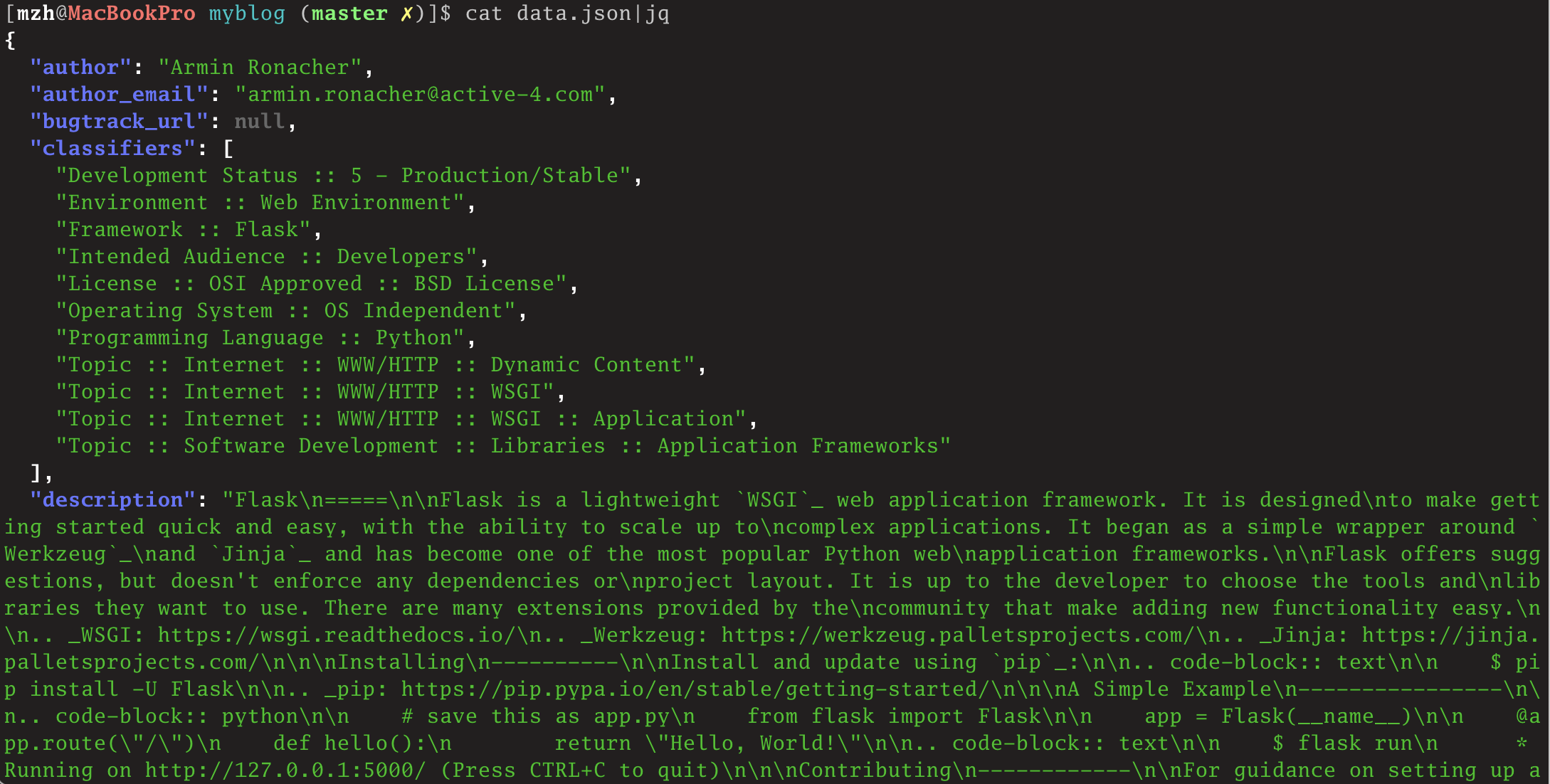
我们也可以输出到文件中,然后使用jq输出查看输出信息:

1
2
3
>>> with open('data.json', mode='w') as f:
...     json.dump(project_info, f)
...

使用jq命令查看: 此时查看的效果也不错。

参考:

https://docs.python.org/3.6/library/pprint.html

Licensed under the GNU General Public License v3.0